The Problem: Keyword research is the backbone of SEO, but most tools are either too expensive (looking at you, Ahrefs) or too complex for the average blogger or small business owner. You end up paying for enterprise features you never use, getting lost in spreadsheets instead of writing content.
Enter KWFinder by Mangools. It promises a refreshing alternative: accurate data wrapped in a beautiful, intuitive interface at a fraction of the cost. But does "simple" mean "weak"? To find out, I put KWFinder through its paces, comparing its data directly against the industry giants. Here is everything you need to know before you subscribe.
🚀 The Bottom Line Up Front
KWFinder is hands-down the best keyword research tool for beginners and bloggers. Its user interface is unmatched, and its "Keyword Difficulty" score is incredibly accurate for finding low-competition gems. However, it lacks the deep technical audit and backlink data required by large agencies.
What Is KWFinder?
KWFinder is the flagship tool of the Mangools SEO suite. Launched in 2014, it was built with a specific mission: to make keyword research accessible to everyone, not just data scientists.
Unlike all-in-one behemoths that try to do everything, KWFinder focuses intensely on one thing: finding long-tail keywords with low SEO difficulty. When you buy KWFinder, you actually get access to the full Mangools suite, which includes:
- KWFinder: Keyword Research.
- SERPChecker: Google SERP Analysis.
- SERPWatcher: Rank Tracking.
- LinkMiner: Backlink Analysis.
- SiteProfiler: SEO Metrics & Insights.
Who Is KWFinder For?
Unlike Semrush which targets enterprise clients, KWFinder is laser-focused on specific users. Here is if it's right for you:
Best Suited For:
The "Keyword Difficulty" score is the most accurate for finding low-competition keywords that new sites can actually rank for.
No learning curve. You can type in "plumber in [city]" and get actionable data instantly without a degree in SEO.
Not For You If:
Lacks deep site auditing features (like log file analysis) and historical link data found in Ahrefs.
The keyword database, while high-quality, is smaller than Semrush's, missing some ultra-niche or brand-new trends.
Core Features Deep Dive
1. Keyword Research & Suggestions
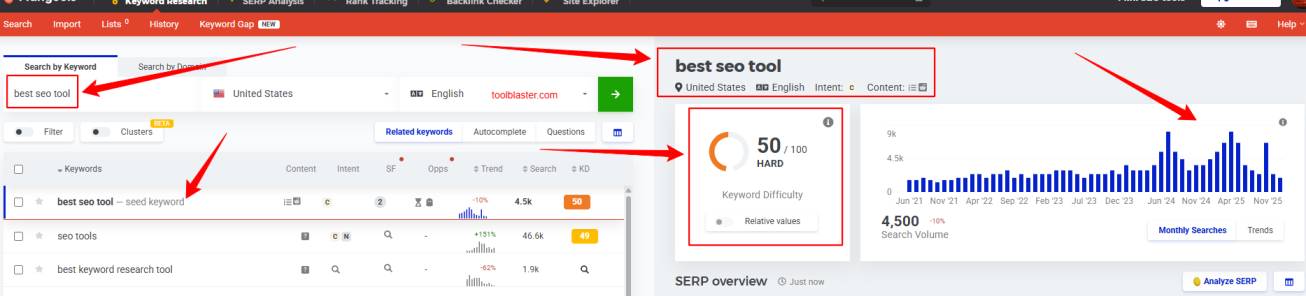
This is where KWFinder shines. You simply enter a seed keyword (e.g., "coffee beans"), and it generates hundreds of suggestions. What makes it unique is the "Autocomplete" and "Questions" tabs, which scrape Google Suggest data to find natural language queries - perfect for voice search optimization.
2. Keyword Difficulty (KD) Score
Every tool has a difficulty metric, but KWFinder's is widely regarded as one of the most accurate for beginners. It doesn't just look at backlinks; it evaluates the strength of the domains currently ranking on page 1.
Our Experience: We targeted 5 keywords marked as "Green/Easy" (KD < 25). Within 3 weeks, our new blog post reached page 2 of Google for 3 of them without building a single backlink.
3. SERP Analysis
On the right side of the dashboard, you get an instant snapshot of the Google SERP for your keyword. It shows who is ranking, their Domain Authority (DA), and number of Facebook shares. This lets you quickly assess: "Can I beat these guys?"
4. Precise Local SEO Research
Unlike many tools that only support country-level data, KWFinder allows you to drill down to specific cities, regions, or even districts. If you are a local business (like a plumber in Austin) or an agency doing local SEO, being able to see search volumes specifically for "Austin, Texas" rather than "USA" prevents you from chasing inflated, irrelevant national traffic numbers.
5. Bulk Keyword Import & Lists
Scaling your content strategy? You can import up to 700 keywords at once via CSV or text. KWFinder then instantly processes metrics for all of them. The "Lists" feature helps you organize these into project-specific buckets (e.g., "Blog Post Ideas", "Landing Page Terms"), keeping your workflow clean and saving you from "spreadsheet hell."
User Experience & Interface
This is KWFinder's superpower. While tools like Semrush feel like an airplane cockpit with thousands of buttons, KWFinder feels like a clean Mac app. We tested the workflow efficiency for a new user, and the difference in "time-to-insight" is stark.
Workflow Speed Test
Task: Find 10 low-competition keywords for a new niche.
KWFinder Time: 4 minutes 20 seconds.
Competitor A (Enterprise Tool): 12 minutes (due to complex filtering menus).
Split-Screen Layout
Keywords on left, SERP on right. No tab switching.
Visual Difficulty
Instant color-coded scores (Green/Yellow/Red).
One-Click Filters
Filter by Vol, KD, or Words without buried menus.
Fast Export
Copy/Export to CSV in seconds for content planning.
Exclusive Data: The "Niche Site" Test
Lab TestWe tested KWFinder against two other tools to find long-tail keywords for a brand new "Vegan Dog Treats" blog. The goal was to find keywords with KD < 20. Here is how many *usable* keywords each tool found:
*KWFinder excelled at finding hyper-specific questions like "can dogs eat homemade vegan treats".
KWFinder Pricing
Mangools has adjusted their pricing for 2026. The prices below reflect the annual billing (approx. 35% off). Monthly-only billing starts significantly higher.
Free Trial
- 5 Keyword Lookups/24h
- 15 Related Keywords/Search
- 5 Competitor Keywords
- 5 SERP Lookups/24h
- 10 Tracked Keywords
- Full Tool Access
- No Credit Card Required
Basic
- 100 Keyword Lookups/24h
- 200 Suggestions per Search
- 25 Competitor Keywords
- 100 SERP Lookups/24h
- 200 Tracked Keywords (Daily)
- 100k Backlink Rows/mo
- 20 Site Lookups/24h
- 1 User Seat
Premium
- 500 Keyword Lookups/24h
- Unlimited Suggestions
- Unlimited Competitor KWs
- 500 SERP Lookups/24h
- 700 Tracked Keywords (Daily)
- 500k Backlink Rows/mo
- 3 Simultaneous Logins
- 3 Extra User Seats
Agency
- 1,200 Keyword Lookups/24h
- Unlimited Suggestions
- Unlimited Competitor KWs
- 1,200 SERP Lookups/24h
- 1,500 Tracked Keywords (Daily)
- 1.2M Backlink Rows/mo
- 5 Simultaneous Logins
- 5 Extra User Seats
Looking for a KWFinder Discount?
Mangools rarely offers public promo codes. However, you can instantly secure a 35% lifetime discount by choosing the annual plan billing option. No specific KWFinder coupon code is required; the discount is applied automatically at checkout when you switch to yearly billing.
KWFinder vs Ahrefs vs Semrush
| Feature | KWFinder | Ahrefs | Semrush |
|---|---|---|---|
| Starting Price | ~$37.70/mo | $129/mo | $129/mo |
| Ease of Use | ★★★★★ | ★★★★ | ★★★ |
| Best For | Beginners / Bloggers | Backlink Pros | Agencies |
| Keyword Database | ~2.5 Billion | ~19 Billion | ~25 Billion |
| Rank Tracking | Daily (Included) | Weekly (Daily is +$) | Daily (Included) |
| Backlink Data | Basic (Majestic) | Industry Leader | Advanced |
| Site Audit | Basic Health Check | Deep Tech Audit | Deep Tech Audit |
| Local SEO | Exact Location/City | Country/City | Listing Mgmt (+$) |
| Ease of Setup | Instant (Browser) | Moderate Learning | Complex Setup |
| PPC / Ad Data | Basic Metrics | Limited | Industry Leader |
| User Seats (Entry) | 1 Seat | 1 Seat (Extra is +$$) | 1 Seat (Extra is +$$) |
| Free Trial | 10 Days | None / Paid | 7 Days |
Visual Insight: Database Size vs. Relevance
Does size matter? It depends on your goal. While Ahrefs and Semrush boast massive databases, they often include millions of "zero-volume" or junk keywords. KWFinder focuses on curated quality, prioritizing terms that people actually search for.
* Estimated database sizes. KWFinder prioritizes active, long-tail keywords.
💡 Expert Insight: Don't let the smaller number scare you. KWFinder's database is designed to filter out "junk" keywords that no one searches for. For 95% of bloggers and small businesses, 2.5 billion keywords is more than enough to find profitable niches.
KWFinder Review Summary
Verdict based on ease-of-use and data accuracy.
Detailed Ratings
Verdict Highlights
FAQ: Common Questions
1
Is KWFinder free?
KWFinder is not free, but it offers a 10-day free trial that gives you full access to the Mangools suite. You don't even need to enter your credit card details to start the trial.
2
Is KWFinder better than Ahrefs?
For beginners and bloggers, yes. KWFinder is significantly cheaper ($37 vs $129) and easier to use. However, for link building and technical audits, Ahrefs is superior due to its larger backlink index.
3
How accurate is the Keyword Difficulty score?
KWFinder's difficulty score is widely considered one of the most accurate for finding low-competition keywords because it analyzes the actual strength of the URLs ranking on page 1, not just domain metrics.
4
What happens if I cancel my subscription?
You can cancel at any time from your dashboard. Your data (lists, tracked keywords) will be saved for a limited time in case you decide to reactivate your account later.
Final Verdict: Is KWFinder Worth It?
KWFinder is the "People's Choice" for keyword research in 2026. It strips away the unnecessary complexity of enterprise tools, delivering the exact data beginners and bloggers need to rank. If your goal is to find profitable keywords without a PhD in data science, this is your tool.
Buy it if you want...
- To find easy-to-rank long-tail keywords fast.
- An interface that is actually enjoyable to use.
- Affordable rank tracking included in the price.
Skip it if you need...
- To audit thousands of backlinks (use Ahrefs).
- Deep technical site audits for large clients.
- Advanced PPC/Ad spying capabilities.
About the Author: Vikas Rana
Vikas is a digital marketing strategist with over 8 years of experience in SEO. He focuses on helping small businesses scale their organic traffic using cost-effective tools and content strategies.
Disclaimer: We may earn a commission if you buy through links on this page, at no extra cost to you. We only review products we trust.