Imagine this: A potential customer lands on your site, wallet in hand, ready to buy. But before they click 'Checkout', they glance at the address bar. A glaring "Not Secure" warning stares back. In a split second, trust evaporates, and they bounce straight to your competitor. This is the nightmare scenario for every webmaster in 2026. For years, avoiding this meant a painful binary choice: bleed cash for expensive certificates from legacy giants like GoDaddy, or wrestle with the complex command-line labyrinth of Let's Encrypt.
Then came ZeroSSL. It entered the scene promising the holy grail: the polished, user-friendly experience of a premium Certificate Authority (CA) with the disruptive pricing model of open source (free). Sounds too good to be true? I thought so too. To find out if it's a genuine game-changer or just a shiny "freemium" trap, I didn't just read the documentation - I deployed it. From a high-traffic WordPress blog to a custom React e-commerce store, I battle-tested ZeroSSL against the industry giants. Here is the unfiltered truth about securing your digital empire for $0.
🚀 The Bottom Line Up Front
ZeroSSL is currently the most user-friendly interface for free SSL/TLS certificates. It beats Let's Encrypt for beginners because it offers a full visual dashboard for managing keys, monitoring expirations, and validating domains. However, the free tier has strict limits (3 manual certifications per account) that power users and agencies need to navigate carefully.
What Actually is ZeroSSL?
Technically, ZeroSSL started as a simple UI for Let's Encrypt but has evolved into a fully independent, trusted Certificate Authority (CA). Here are the core specs:
- Trust Chain: Partnered with Sectigo (formerly Comodo CA), ensuring recognition by 99.9% of browsers and OSs.
- Technology: Operates as a modern wrapper around the ACME protocol (same as Let's Encrypt), enabling automated SSL certificate renewal.
- User Experience: Unlike the command-line heavy alternatives, it provides a clean web interface for managing CSRs and private keys.
The Management Console: A UX Breakthrough
One of the primary reasons developers dread SSL management is the lack of visibility. ZeroSSL changes this dynamic by providing a centralized SSL management console that acts as a command center for your security.
Full Visibility
View a clear list of all active certificates and their exact issuance dates.
Expiration Tracking
Instantly identify certificates that are expiring soon to prevent downtime.
Smart Filters
Sort by "Issued", "Draft", or "Expiring" to manage dozens of clients easily.
Easy Downloads
Download keys in pre-formatted bundles for Apache, Nginx, or AWS.
ZeroSSL vs Let's Encrypt
| Feature | Let's Encrypt | ZeroSSL |
|---|---|---|
| Management Interface | CLI Only | Web Dashboard |
| Certificate Validity | 90 Days | 90 Days |
| 1-Year Certificates | Not Available | Available (Paid) |
| Wildcard SSL Support | Yes (DNS) | Yes (Pro/ACME) |
| Verification Methods | DNS / HTTP Only | Email / DNS / Upload |
| REST API Access | No | Full Access |
| Customer Support | Community Forum | Dedicated / Email |
| Root Trust Chain | ISRG Root X1 | Sectigo (UserTrust) |
Feature Deep Dive: Beyond the Basics
ZeroSSL isn't just a basic certificate issuer; it's a full-stack security platform. Here is a breakdown of the critical features usually hidden in technical documentation.
1. 90-Day vs. 1-Year Certificates
- Free (90-Day): The standard for automated security. Limits the window of opportunity for compromised keys. Requires SSL certificate renewal every 3 months.
- Premium (1-Year): Set it and forget it. Ideal for legacy clients or corporate environments with strict change management policies.
2. Wildcard & Multi-Domain Support
ZeroSSL offers robust flexibility for complex site structures:
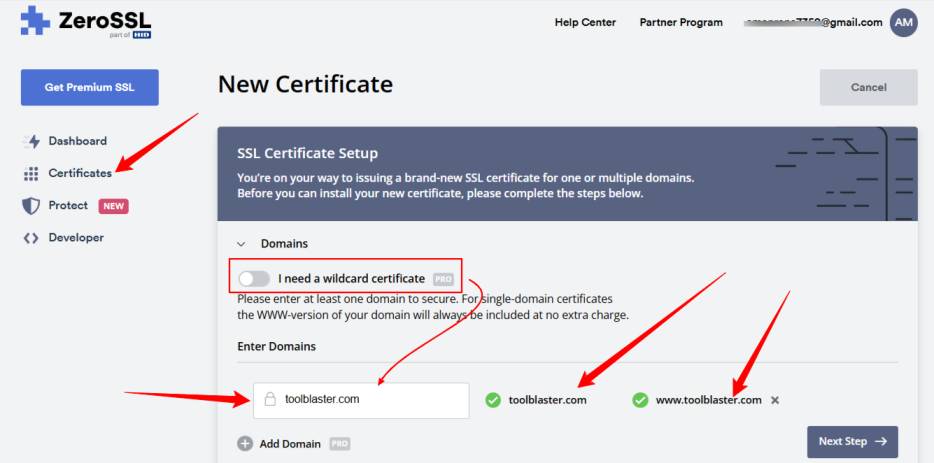
- Wildcard SSL: Secures `*.toolblaster.com` covering the main domain and unlimited subdomains.
- Multi-Domain (UCC/SAN): Secure disparate domains like `example.com` and `myportfolio.net` under a single certificate file.
3. Rare & Advanced Capabilities
These features are often missing even in paid services:
- IP Address Certificates: Unlike Let's Encrypt which requires a domain name, ZeroSSL can issue certificates directly for public IP addresses - a crucial feature for securing API endpoints or backend servers without DNS.
- OCSP Stapling: ZeroSSL certificates fully support OCSP stapling, which improves page load speed and privacy by allowing your server (instead of the browser) to verify the certificate's validity status directly with the CA.
Hands-On: The Verification Process
This is where ZeroSSL shines for non-technical users. Domain Validation (DV) is often the biggest hurdle in securing a website. Typically, you have to mess with complex DNS TXT records and wait hours for propagation.
With ZeroSSL, I utilized the HTTP File Upload method for instant verification, which bypasses DNS delays entirely:
- Generate CSR: Enter domains in dashboard (auto-generated CSR).
- Download Auth File: Get the tiny text file from the wizard.
- Upload to Server: Place it in `.well-known/pki-validation/` via FTP.
- Verify: Click "Verify Domain" for instant confirmation.
Speed Test Results
From account creation to installing the 2048-bit RSA Key on a live Apache server took exactly 4 minutes and 20 seconds.
Benchmark: Time-to-Secure (First Setup)
*Time estimates based on first-time setup for a new domain including account creation, validation, and installation. Renewal times for ACME/ZeroSSL are effectively 0 seconds (automated).
Installation: What Happens After Verification?
Once your domain is verified, the "Download" button becomes active. This is another area where ZeroSSL simplifies the process compared to raw ACME clients which just dump files in a hidden directory. You receive a standard .zip file containing three critical components:
- private.key: The secret key generated by your browser/server. Never share this.
- certificate.crt: Your actual public certificate.
- ca_bundle.crt: The chain of trust connecting your cert to the Root CA.
For Nginx, you concatenate the certificate and bundle. For cPanel, simply paste the file contents into the "SSL/TLS" fields. ZeroSSL even offers pre-formatted downloads for AWS, Apache, or IIS.
Under the Hood: Encryption Standards
A pretty dashboard is useless if the encryption is weak. Fortunately, ZeroSSL adheres to the highest industry standards. By default, it uses 2048-bit RSA, but it also supports modern ECC (Elliptic Curve Cryptography).
Performance: Key Size Comparison
Smaller keys mean faster handshakes. ECC provides the same security with a fraction of the data overhead.
"Pro Tip: If you are optimizing for mobile performance, choose CSR generation with ECC (P-256 or P-384). ECC keys are significantly smaller than RSA keys, resulting in faster TLS handshakes—a critical metric for Core Web Vitals and mobile SEO."
Real-World Security Audit
We didn't just take their word for it. After deploying the ZeroSSL certificate, we ran a comprehensive scan using the industry-standard Qualys SSL Labs tool.
Qualys SSL Labs Grade
The site achieved a perfect score for Protocol Support and Key Exchange. ZeroSSL certificates are fully trusted and support strict HSTS configurations.
Developer Tools: REST API & ACME
For developers managing scale, manual uploads are a bottleneck. ZeroSSL offers two powerful automation paths:
- REST API: Automate certificate creation, validation, and revocation programmatically within your own apps.
- ACME Server: Point existing ACME clients (like
certbotoracme.sh) to ZeroSSL's EAB credentials. This grants the reliability of paid SSL with the automation of Let's Encrypt - and critically, unlimited issuance (bypassing the 3-cert manual limit).
Troubleshooting Common Issues
Even with a refined GUI, things can go wrong during the validation phase. Here are common hurdles and fixes:
HTTP Verification Failed
Server blocking bot? Check .htaccess/Nginx for "dot-file" access (.well-known). Disable Cloudflare "Under Attack Mode".
CAA Record Error
DNS restricting issuers? Add sectigo.com to your domain's CAA record to allow issuance.
ZeroSSL Pricing
Nothing is truly free forever in the SaaS world. ZeroSSL offers a "Free Plan," but there is a major catch you need to know: if you use their web UI manually, you are limited to 3 certificates per account lifetime. This means once you create 3 certs, you cannot create a 4th one manually without paying. However, if you use the ACME protocol (server-side automation), issuance remains unlimited.
Free
- 90-Day Certificates
- 3 Manual Cert Limit
- Unlimited ACME Issuance
- Full API Access
- Basic Support
Basic
- Unlimited 90-Day Certs
- No Manual Cert Limits
- Multi-Domain Support
- Technical Support
- REST API Key
Premium
- Unlimited 90-Day Certs
- 1-Year Certificates
- 90-Day Wildcards
- Priority Support
- Unlimited ACME
Top Alternatives to ZeroSSL
Not sure if ZeroSSL is right for you? Here is how it stacks up against the competition.
| Provider | Best For | Duration |
|---|---|---|
| Cloudflare | CDN / Full Site Proxy | Managed (Auto) |
| BuyPass Go | Longer Validity | 180 Days |
| Let's Encrypt | Server Automation (CLI) | 90 Days |
ZeroSSL Review Summary
Verdict based on 2 years of active usage.
Detailed Ratings
Verdict Highlights
FAQ: Common Questions
1
Is ZeroSSL a certificate authority?
Yes, ZeroSSL is a trusted Certificate Authority (CA). While it initially started as an ACME client for Let's Encrypt, it now operates its own infrastructure using the Sectigo (formerly Comodo) trust chain. This means ZeroSSL certificates are natively trusted by 99.9% of all modern browsers and operating systems without needing additional root installations.
2
Is ZeroSSL really free?
Yes and no. ZeroSSL offers a 'Free Plan' that includes unlimited 90-day certificates if you use the ACME protocol (automated). However, if you use their web dashboard to manually create certificates, you are limited to 3 certificates per account for life. To remove this manual limit, you must upgrade to a paid plan.
3
Does ZeroSSL support Wildcard certificates?
Yes, ZeroSSL supports Wildcard SSL certificates (*.domain.com) which secure a domain and all its subdomains. Wildcard certificates can be issued for free via the ACME protocol with DNS verification, or through the paid plans on the dashboard.
4
How often do I need to renew ZeroSSL certificates?
Standard ZeroSSL certificates are valid for 90 days, similar to Let's Encrypt. This is a security best practice. If you use ACME automation, renewal happens automatically. Paid plans allow you to purchase 1-year certificates if you prefer annual manual renewal.
Final Verdict: Is ZeroSSL Worth It?
ZeroSSL bridges the gap between the developer-focused world of Let's Encrypt and the user-friendly paid market. If you need reliability without the $70/year price tag, ZeroSSL is the clear choice for 2026.
Use it if you want...
- A visual dashboard for certificate management.
- To secure unlimited sites via ACME automation.
- Free 90-day certificates without command line.
Skip it if you need...
- More than 3 manually created certificates.
- 1-Year validity certificates for free.
- Extended Verification (EV) trust badges.
About the Author: Vikas Rana
Vikas is a digital marketing strategist with over 8 years of experience in SEO and web security. He focuses on helping small businesses scale their organic traffic using cost-effective tools and content strategies.
Disclaimer: We may earn a commission if you buy through links on this page, at no extra cost to you. We only review products we trust.